


Skip to content
For fabric warehouses and wholesalers

Every roll numbered. Stock counts no longer take days.

Stock for an upholstery fabric warehouse: each roll is labelled once, and its quality, colour, batch, rack and remaining metres are on your phone. Cuts, moves and counts are recorded the moment they are scanned; no more typing up notebooks afterwards.

From €29/month · no setup fee · cancel any month

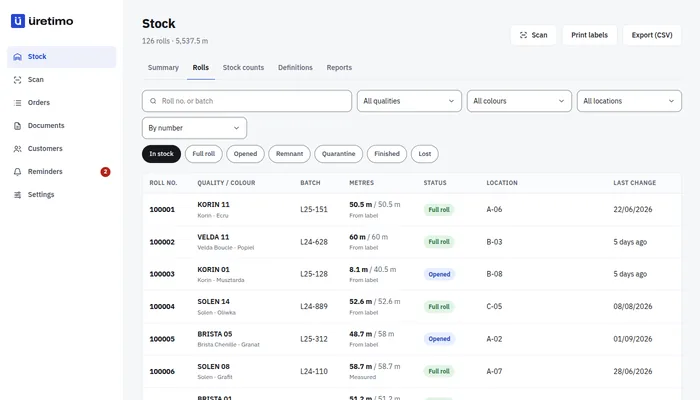
Stock screen: roll number, quality and colour, batch, metres, status and rack columns
Real screen, demo data.

Stock in a notebook, or stock on your phone.

  • Today: Korin 01, rack B, 8 m?

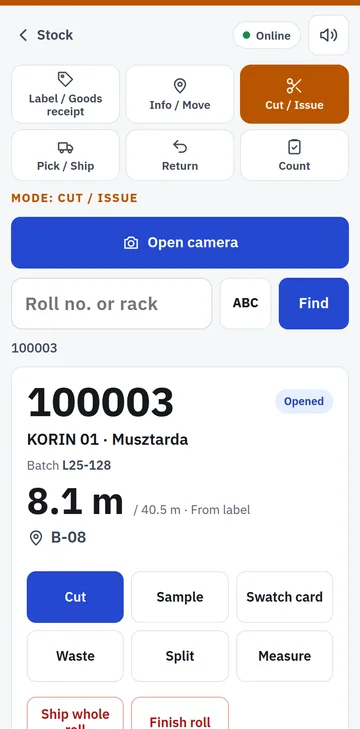
    In Üretimo: Roll 100003 · B-08 · 8.1 m
  • Today: 300 m in the system, nothing on the rack.

    In Üretimo: Stock roll by roll: each roll's own metres.
  • Today: Stocktake: notebook first, then days of typing it in.

    In Üretimo: Scan rack by rack; when you finish, the result is in the system.
Stock screen

Stock roll by roll, not just total metres.

  • Each roll’s number, quality, colour, batch, rack and remaining metres on one row.
  • You know where the metres come from: label, measured or weight.
  • Full roll, opened roll, remnant, quarantine: filter by status, total by quality and colour.
  • Low stock: colours below their minimum metres on the summary screen.
  • Download the list as Excel at any time.
Stock screen: roll number, quality and colour, batch, metres, status and rack columns
Real screen, demo data. Open this screen live →
Scan on the phone

In the warehouse, on a phone: scan, choose, done.

The Scan screen has six modes: Label / Goods receipt, Info / Move, Cut / Issue, Pick / Ship, Return and Count. Scan a roll and its details appear in large type; the next step is one tap.

  • Goods receipt: stick on the next label and scan it; pick quality, colour and batch once, then enter only metres or weight for the following rolls.
  • Cutting: metres sent to the customer and metres taken off the roll are recorded separately; no new label needed.
  • Split roll, sample, swatch card, waste: one tap, with a reason; all written to the roll’s history.
  • Moving rolls: scan the rack first, then the rolls.
  • Pick / Ship: scan the rolls on the order’s picking list; confirm the shipment and the dispatch note is issued.
  • Return: scan the roll coming back from the customer; the return document is issued and the roll goes into quarantine.
  • Scanning: phone camera, Bluetooth scanner or typing the number.
Cut / Issue mode on a phone: scanned roll number, quality, remaining metres, rack and buttons for cut, sample, swatch card, waste and split
Real screen, demo data. Open this screen live →
Stock count

Rack-by-rack stock counts. A missing roll does not vanish; it goes on a list.

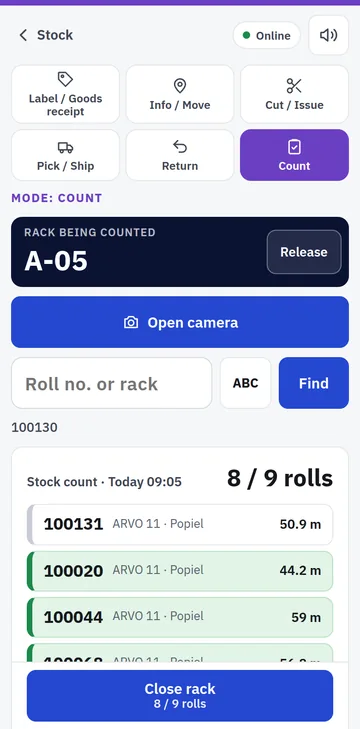
Scan a rack and the rolls that should be on it are listed. Each scanned roll turns green; when you close the rack, the missing rolls go on a separate list and a manager decides roll by roll. When the count is finished, the result is already in the system: no days of typing up.

  • Opened rolls are weighed; metres are estimated from the weight, and if the gap is large the roll is measured.
  • Sales keep going during the count: each rack is compared with the list at the moment it is closed.
  • Difference report and printable count record; export to Excel.
  • During short connection drops, readings wait on the phone and are sent when the connection returns.

Goal Stocktaking in a few hours instead of 5 days.

Rack count on a phone: 5 of 6 rolls on rack B-05 scanned, one not found yet
Real screen, demo data. Open this screen live →
Orders and documents

Sales orders, reservations and dispatch. Included in every plan.

Write the order in the office and reserve the rolls; the warehouse picks and dispatches by scanning the picking list on a phone. Documents are issued by themselves at goods receipt, dispatch and returns; Üretimo tells you what to invoice.

  • Sales orders and roll reservations: a reserved roll is not cut for someone else.
  • Picking list and Pick / Ship on a phone: which roll, from which rack, how many metres; each scanned roll turns green.
  • Numbered, unchangeable warehouse documents: goods receipt, dispatch, return, waste and opening balance; printed on A4.
  • Customer cards and a price list per quality or colour.
  • Reports: metres dispatched per customer and quality, idle rolls, stock ledger.
Swatch book

Show the fabric on a sofa, not just on a swatch.

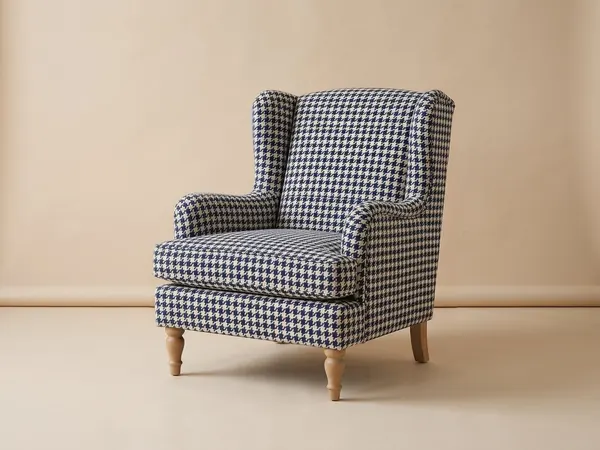
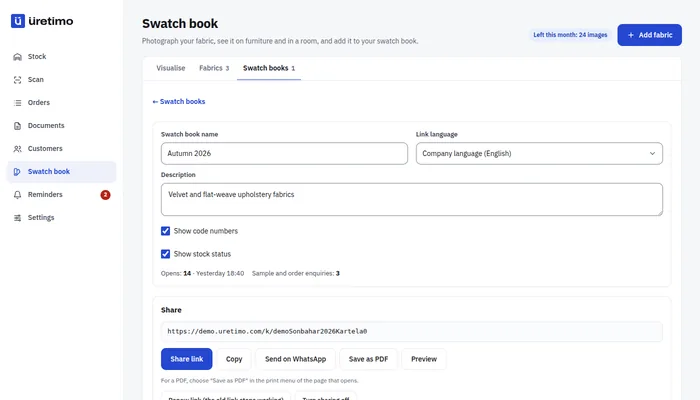
Upload a photo of the swatch, then choose the furniture and the setting. In about 10–20 seconds you get an image of how the fabric could look on a sofa, chair or headboard.

  • 5 furniture types: three-seat sofa, corner sofa, armchair or wing chair, upholstered chair, headboard
  • A plain studio backdrop or 4 room styles: Modern, Scandinavian, Classic, Japandi
  • The instant preview uses no credits; each image uses 1 credit at Standard quality, 2 at Print quality
  • 30 / 60 / 100 images a month (Small / Medium / Large plan). Add-on packs that never expire: 100 images €29 · 500 images €119
  • Every image is labelled “Illustrative image”; pattern scale is approximate
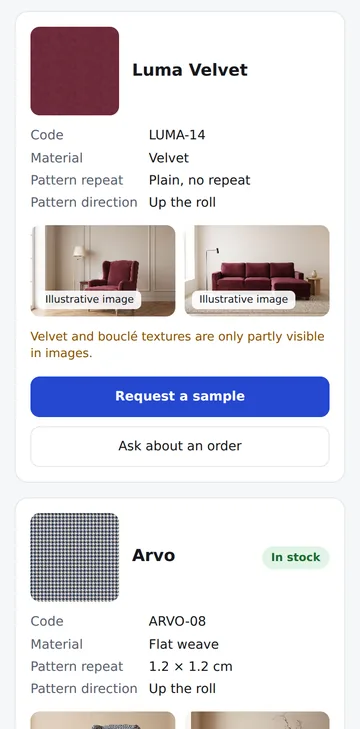
Corner sofa in burgundy velvet, modern living roomLuma burgundy velvet swatchSwatch
  • Wing chair in navy and cream houndstooth, plain studio backdropPattern scale approximate
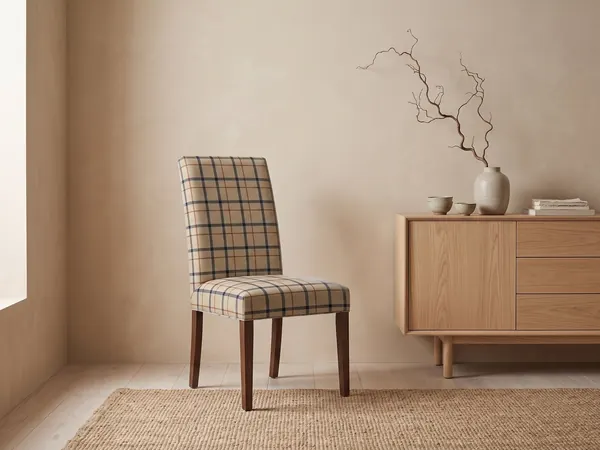
  • Upholstered dining chair in a beige check, Japandi dining areaPattern scale approximate
  • Wing chair in burgundy velvet, classic living room
Sample images created with image generation from fictional fabrics. Pattern scale is approximate.
First week

Label your warehouse in three steps.

  1. Load your definitions Upload qualities, colours and racks from Excel or enter them by hand. Print rack labels on A4 paper.
  2. Label the rolls Print numbered roll labels or order sequentially numbered labels from a printer; label each roll once, at goods receipt or during the first count.
  3. Do the first count Scan the racks one by one. After the first full count, a count is just a scanning round; small rack counts take minutes.
Hardware

What you need

  • A phone: Android or iPhone; it runs in the browser, no app to install.
  • A Bluetooth barcode scanner (optional): the fastest way to count, works with gloves on.
  • Scales: to check the metres on opened rolls.
  • Numbered labels: on A4 label sheets (3 × 8) or a thermal printer; with a QR code and a Code128 barcode.
Bring your spreadsheet

Bring your quality, colour and rack lists; your definitions come ready.

If you like, we import your Excel list together during setup: send your file and we match the columns together.

  1. Upload your file Your quality, colour and rack list; Excel or CSV, as it is.
  2. Match the columns Each column is matched once; the screens open in your words.
  3. Check and save Look at the preview, fix the gaps, save.

Ask for setup help

Pricing

One plan, open price.

No setup fee, no commitment; cancel any month.

All plans and add-ons →

Prices in euro, excluding VAT · Unlimited users · No setup fee · Pay yearly and get 2 months on us

Small

Small teams getting started

€29/month · excl. VAT

€24.17/month equivalent · 2 months on us

  • Up to 30 active orders
  • Unlimited users*, workshop and warehouse staff included
  • Unlimited customer tracking links
  • 30 images a month (fabric try-on, swatch book, render)
  • Files and photos, 200 MB
  • Add Finance: +€9/month
Sign upOpen the demo →
Recommended

Medium

For most workshops and offices

€49/month · excl. VAT

€40.83/month equivalent · 2 months on us

  • Up to 100 active orders
  • Unlimited users*, workshop and warehouse staff included
  • Unlimited customer tracking links
  • 60 images a month (fabric try-on, swatch book, render)
  • Files and photos, 300 MB
  • Add Finance: +€9/month
Sign upOpen the demo →

Large

High volume; Finance included

€79/month · excl. VAT

€65.83/month equivalent · 2 months on us

  • Unlimited active orders
  • Unlimited users*, workshop and warehouse staff included
  • Unlimited customer tracking links
  • 100 images a month (fabric try-on, swatch book, render)
  • Files and photos, 500 MB
  • Finance module included
Sign upOpen the demo →
Setup

Setup help is included in every plan.

Send us your spreadsheet and we'll do the first setup together.

The Üretimo team

I'll send my spreadsheet, let's set it up together

Questions

Frequently asked questions

Will it replace my current warehouse software?

It does not have to straight away. You can run Üretimo next to your current system: rolls, racks, orders and documents (PZ, WZ) in Üretimo, invoices in your accounting software. When you are ready, move the whole warehouse here; the opening balance (BO) document takes over your current stock in one go.

Does it issue invoices? What about KSeF?

No. Invoices and KSeF stay in your accounting software (for example Symfonia). Üretimo handles the operational side of the warehouse: rolls, racks, cutting, counts, orders and WZ. After every dispatch it prepares the to-invoice list for Symfonia; you match the invoice number you issued back to the list.

How do I print labels?

From the label screen you print numbered roll labels and rack labels on A4 label sheets (3 × 8) or a thermal printer. Each label has a QR code, a Code128 barcode and a large number. You can also order sequentially numbered labels from a printer.

How many people can use it?

As many as you need: users are unlimited on every plan, including warehouse staff scanning with phones. You choose the plan by active orders.

What if the internet drops?

Cutting, moving and dispatch only work with a connection; the result is shown once the record is saved. Count readings wait on the phone during short drops and are sent when the connection returns.

How do I bring in my current stock?

Upload qualities, colours and racks from Excel. Rolls enter the system once they are labelled in Label / Goods receipt mode; that first labelling round becomes your opening stock.

Which languages does the interface support?

Polish, English and Turkish. Each user picks their own language: the warehouse can work in Polish while the office uses English.

Is our data safe?

Yes. Your data stays with your team: no other company can see it, and in your team everyone sees only what their role allows. Stock records are never deleted; every movement is kept with who made it and when.

Can the image replace a physical sample?

No. The image gives your customer an idea; colour and texture vary from screen to screen, and pattern scale is approximate. We recommend sending a sample before they decide; the swatch book has a “Request a sample” button for that.

Every roll numbered. Sign up today.

Sign up and choose your plan; your account opens as soon as payment is confirmed. If you like, we import your definitions from Excel together during setup.

Show me the demo first →If you like, we import your Excel list together during setup →

Other industries