Skip to content
For architecture and interior design offices that run the fit-out

What did you pay contractors, what did the client pay you, what profit is left?

On every project you build, quotes, contracts, instalments, extras and collections sit on one card. Profit is worked out for you.

Flat price by office size · From €29/month · excl. VAT

Summary of the sample villa project: contract, contractor cost, profit on extras, profit and an overdue client payment
Real screen, demo data.

Your spreadsheet works, until the project grows.

  • Today: Five payment columns, balance by hand.

    In Üretimo: Instalment plan; balance worked out.
  • Today: Same contractor, three spellings.

    In Üretimo: Contractor card: one name, every contract.
  • Today: Quote in a separate file, totals by hand.

    In Üretimo: Branded quote from your items; the client approves by link.
  • Today: Profit split across two sheets.

    In Üretimo: Project summary: profit and margin on one line.
Sample data

Four screens, one project.

Money

  • Contractors and contracts; what's still owed to each.
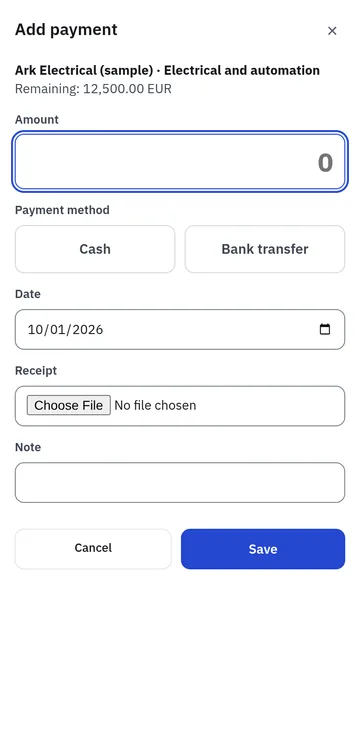
  • Dated instalments; enter a payment on one phone screen.
  • Extras, client collections and project profit in one summary.
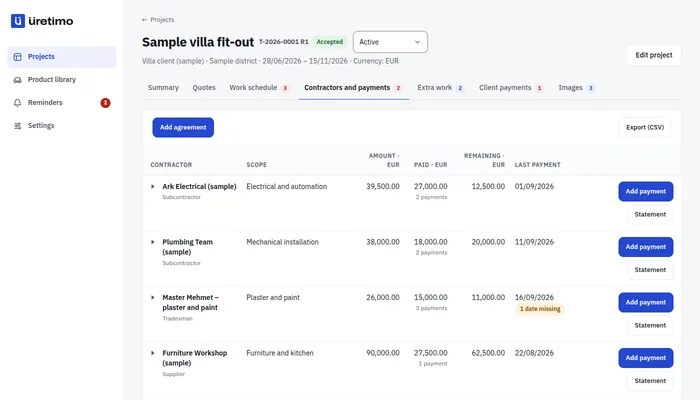
Contractors and payments tab of the sample project: each contractor’s contract, amount paid and balanceEntering a payment on the phone: contractor, amount, date and channel
Real screen, demo data. Open this screen live →

Branded quotes for your clients

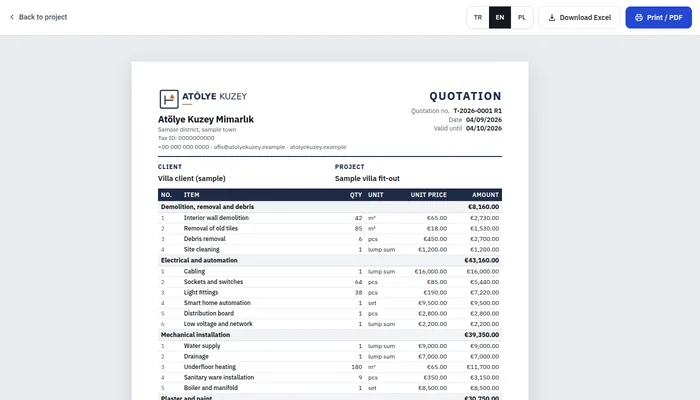
  • A quote with your logo and letterhead: save it as PDF, download it as Excel.
  • Send it by email, WhatsApp or link; you see when it is opened.
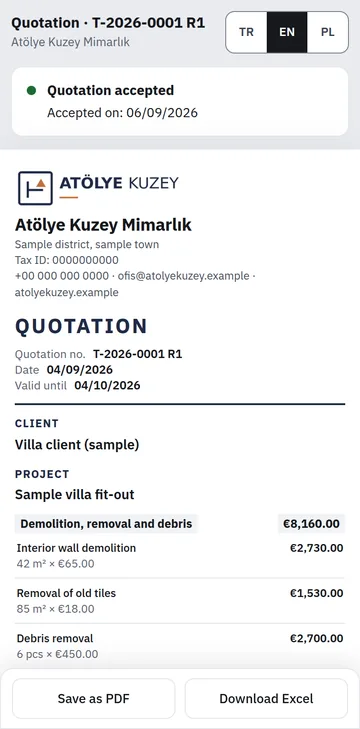
  • The client accepts or asks for changes from the link; acceptance goes into the project and its payment plan.
Sample quote with logo and letterhead: work groups, items, totals and payment planThe quote page on the client’s phone: I accept and Request changes buttons
Real screen, demo data. Open this screen live →

Schedule

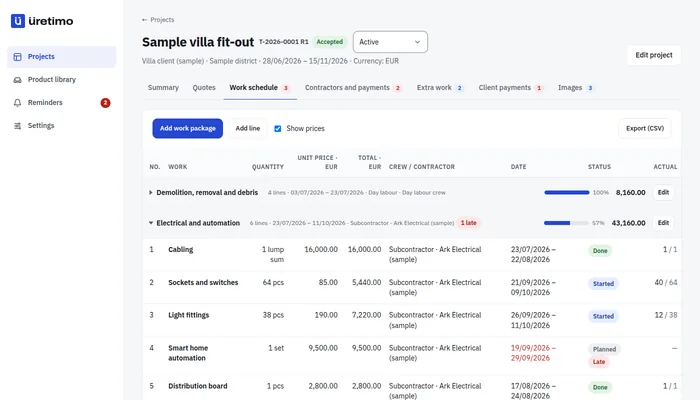
  • Every item with its contractor, start and end date.
  • Late items in red; each work group shows a labelled count of late items.
  • Export the schedule to Excel.
Work schedule of the sample project: work groups, items, contractors, dates and late items
Real screen, demo data. Open this screen live →

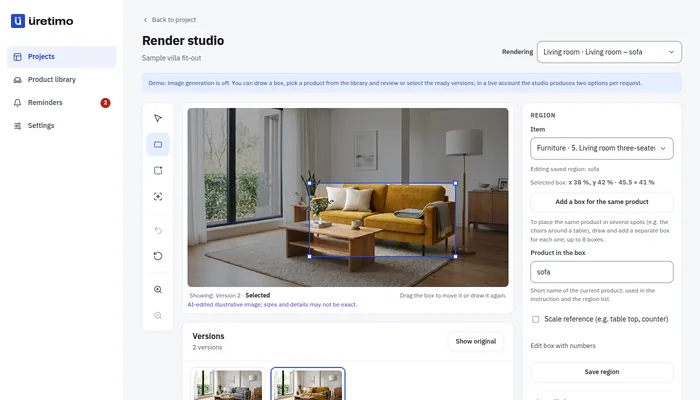
Visual studio

  • Change materials and colours on an existing render.
  • Before / after comparison.
  • 30 images a month on Small, 60 on Medium, 100 on Largece.
Visual studio: the material of a selected area changes on a sample living room image
Real screen, demo data. Open this screen live →
Bring your spreadsheet

Import your project spreadsheet and see the profit on screen.

If you like, we import your Excel list together during setup: send your file and we match the columns together.

  1. Upload your file Your project spreadsheet; its sheets become one project; Excel or CSV, as it is.
  2. Match the columns Each column is matched once; the screens open in your words.
  3. Check and save Look at the preview, fix the gaps, save.

Ask for setup help

Pricing

Three plans by active projects; unlimited users.

No setup fee, no commitment; cancel any month.

All plans and add-ons →

Prices in euro, excluding VAT · Unlimited users · No setup fee · Pay yearly and get 2 months on us

Small

Small teams getting started

€29/month · excl. VAT

€24.17/month equivalent · 2 months on us

  • Up to 30 active orders
  • Unlimited users*, workshop and warehouse staff included
  • Unlimited customer tracking links
  • 30 images a month (fabric try-on, swatch book, render)
  • Files and photos, 200 MB
  • Add Finance: +€9/month
Sign upOpen the demo →
Recommended

Medium

For most workshops and offices

€49/month · excl. VAT

€40.83/month equivalent · 2 months on us

  • Up to 100 active orders
  • Unlimited users*, workshop and warehouse staff included
  • Unlimited customer tracking links
  • 60 images a month (fabric try-on, swatch book, render)
  • Files and photos, 300 MB
  • Add Finance: +€9/month
Sign upOpen the demo →

Large

High volume; Finance included

€79/month · excl. VAT

€65.83/month equivalent · 2 months on us

  • Unlimited active orders
  • Unlimited users*, workshop and warehouse staff included
  • Unlimited customer tracking links
  • 100 images a month (fabric try-on, swatch book, render)
  • Files and photos, 500 MB
  • Finance module included
Sign upOpen the demo →

Extra images: 50 for €15 · 100 for €29; they don't expire. Unlimited users. Excl. VAT · no setup fee.

Setup

Setup help is included in every plan.

Send us your spreadsheet and we'll do the first setup together.

The Üretimo team

I'll send my spreadsheet, let's set it up together

Questions

Frequently asked questions

My spreadsheet works. Why switch?

Keep it: we import it and you can export any time. The difference: balances and profit are worked out for you, and each contractor sits on one card.

How does a quote reach the client?

You build the quote from the project items; it carries your logo and letterhead, saves as PDF and downloads as Excel. Send it by email, WhatsApp or link; the client accepts or asks for changes from the link. Acceptance goes into the project and its payment plan.

Who sees client and contractor details?

Only your office's users, each limited by their role.

How does the visual studio work?

Upload an existing render, select the area and change the material or colour. Each change uses one image from your plan.

Does the price depend on the number of users?

No. Users are unlimited; you choose Small, Medium or Large by your number of active projects and orders. The same plans apply to every trade.

What happens to my projects if I leave?

Cancel monthly. All your data downloads in one click (CSV files that open in Excel).

Your project's money on one screen.

Sign up and choose your plan; your account opens as soon as payment is confirmed. If you like, we import your Excel list together during setup. Open prices, no setup fee.

Show me the demo first →If you like, we import your Excel list together during setup →

Other industries